
March 2026
Configurable AI classification thresholds
You can now adjust the threshold that determines when a commit or pull request is classified as AI-assisted. Tailor the default 50% threshold to improve the accuracy of your data across AI Insights and AI Analytics to match your team's development practices. Learn more.
Multi-domain SSO support
For orgs using multiple email domains, you can now add up to 15 domains to a single SSO configuration, allowing every user to authenticate with their approved company domain. Learn more.
MCP Server: Now generally available for admins with OAuth
Generally available to admins, connect to the MCP Server using OAuth authentication for a faster, more secure setup that replaces the previous token-based flow. Additionally, the MCP Server now surfaces AI Analytics data. Query adoption, usage, and delivery impact metrics.
Combined with performance optimizations, you get faster responses and richer context when using the MCP to explore how your engineering organization operates.
Copilot and Cursor Metrics dashboards retiring April 2
The standalone Copilot and Cursor Metrics dashboards, along with the AI Tool Usage views on the AI Insights dashboard, will be deprecated on April 2. These dashboards relied on third-party API data that could include contributors from outside your LinearB team environment, creating confusion and mismatched reporting. They also limit org-level granularity with no drill-down by team, user, or repo, making reporting less impactful.
Going forward, we recommend using the dashboards in AI Analytics for more accurate, filterable AI data to measure adoption and impact.
February 2026
AI Analytics: Measure AI impact on delivery and quality
You now have a comprehensive way to measure how AI adoption shapes engineering outcomes. AI Analytics connects AI activity directly to commits and PRs so you can compare AI-assisted work against human work across your entire codebase. Understand whether velocity gains come at the cost of quality.
Dig into trends across workflows, repos, teams, and users, and dive deeper into reports that cover delivery, throughput, and quality metrics. Slice data by workflows, tools, team, user, or repo to compare AI-assisted vs. human work side-by-side. Learn more.
Supported API integration for Claude Code
Claude Code joins GitHub Copilot and Cursor as a natively supported AI tool integration. Get deep telemetry with AI activity mapped directly to commits and PRs so you can measure adoption, usage, and delivery impact across your full AI tool stack from a single platform. Admins can integrate this under Settings > Company Settings > AI Tools > Claude Code. Learn more.
Updated navigation: New productivity tab
You’ll notice a refreshed navigation layout designed to make it easier to find what you need. A new “Productivity” tab now houses AI Insights and Surveys, keeping adoption and developer sentiment together. For AI-specific impact metrics, head over to Metrics > AI Analytics.
Smarter user management with auto-merge and bulk merge
Keeping contributor records clean just got easier. New auto-merge capabilities now run in the background, automatically matching and consolidating user accounts, including AI tool identities, by email or provider ID. No manual effort required. Learn more.
For remaining duplicates, a new bulk merge interface surfaces suggested matches ranked by confidence level so you can review and apply merges in a single action. Cleaner records mean more accurate metrics across the platform. Learn more.
GitHub team sync at scale
If you manage team structures in GitHub, you can now sync them directly into LinearB with automatic daily refreshes to keep everything current. Partial sync support lets you choose specific teams to include or exclude so your setup reflects how your organization operates. And improved handling for nested teams and org-level changes means fewer manual adjustments as your teams evolve. Learn more.
January 2026
Enhancements
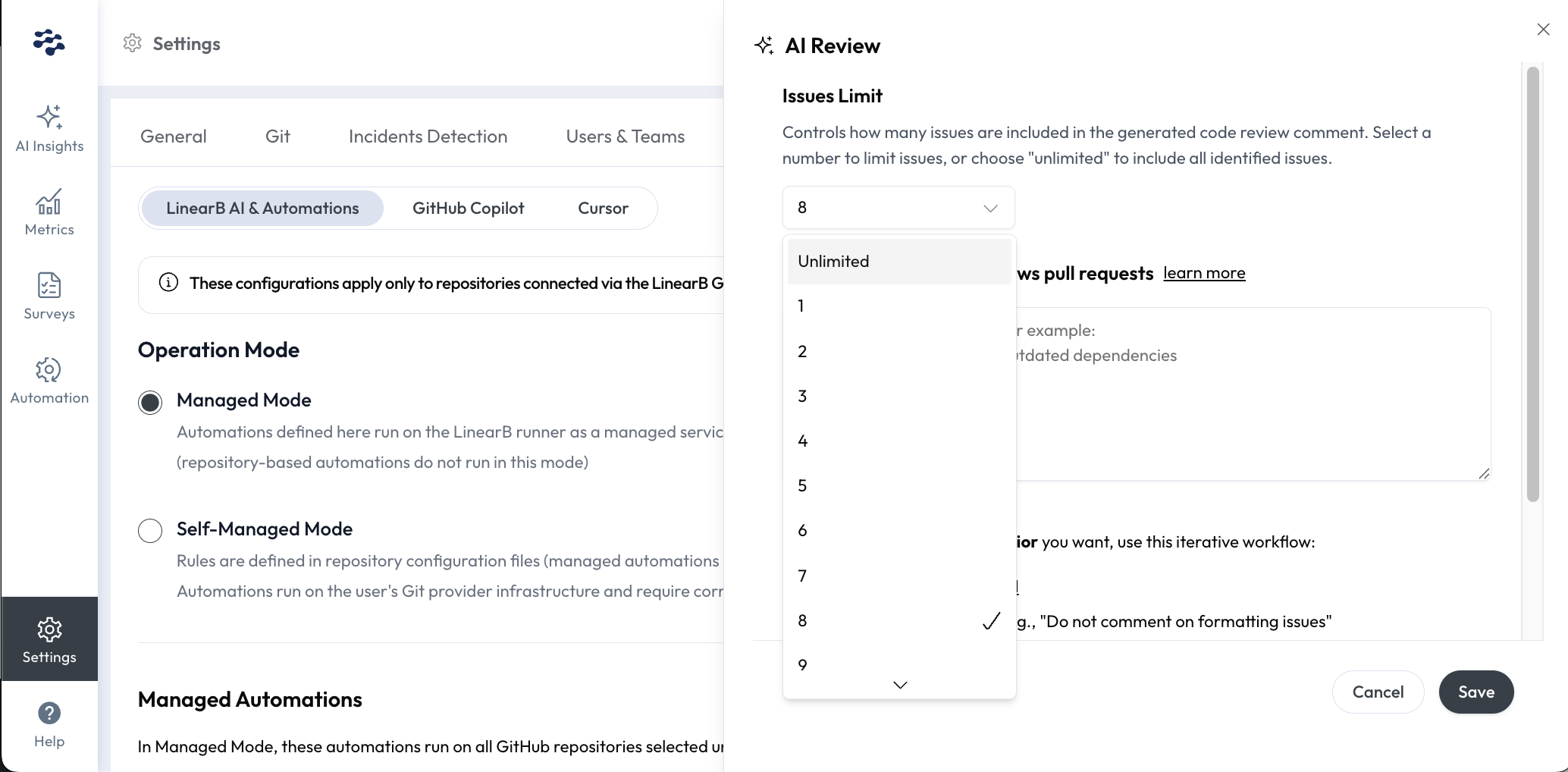
Control how many issues appear in AI Code Review comments
A new issue_limit setting lets you define and limit the number of issues included in PR comments generated by the LinearB AI Code Review. Read the docs.
User admins in Essentials using the managed mode can configure this directly in your Settings UI under AI Tools > Managed Automations > AI Review > Edit > Issues Limit.
New user and team management experience
We've made it easier for admins to manage users, teams, and billing by streamlining workflows into a single tab in Settings > Users & Teams. In this tab, user identities can be merged across Git and project management tools, deleted and hidden, and filtered by billable vs. non-billable status. Read the docs on what's changed.
Fixes
OPA v4.1.5 improves GitLab contributor accuracy. This upgrade provides cleaner, more reliable contributor data from GitLab, making it easier to identify and merge accounts with autogenerated names such as "Anonymous-123."